Luma
In 4 days
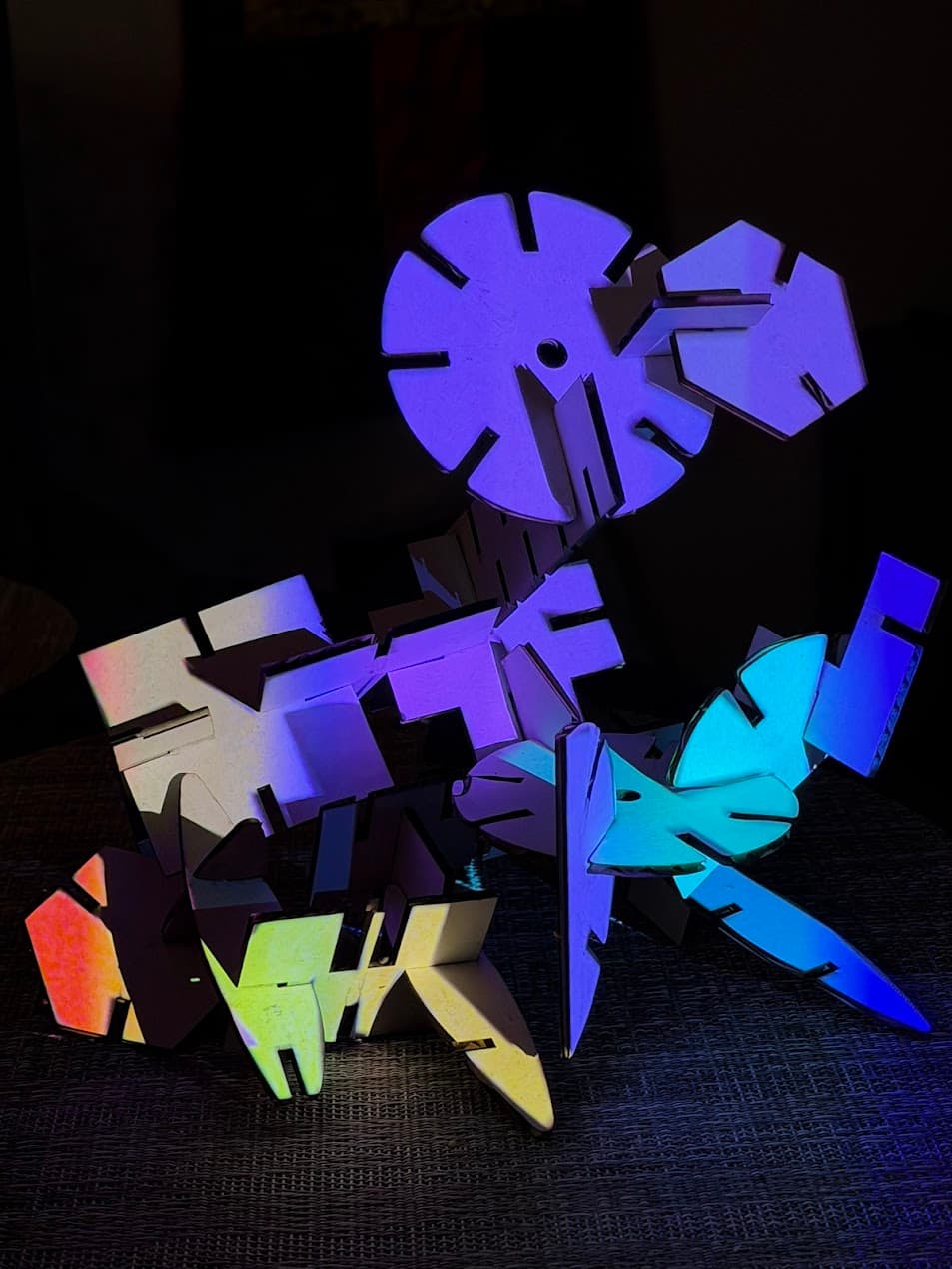
ACTIVATED SCULPTURE — Cardboard Construction & Projection Mapping with TouchDesigner
About this event
What You'll Learn
Principles of 3D sculptural form and structural thinkingHow to use a modular cardboard + 3D-printed connector construction system with inspired lasercut shapesHow artists have used light, projection, and sculpture as a unified mediumProjection mapping fundamentals using TouchDesigner and KantanMapperHow to design and apply visuals to irregular, hand-built surfacesIterative making: building, testing, adjusting, and responding
What's Provided
All cardboard materials, lasercut shapes, and 3D-printed connectors (yours to keep)Cutting tools, tape, and assembly supplies1 projector shared between every 2 participantsLunchDigital takeaway: photo and video shoot of your finished piece
Workshop Schedule
11:00–11:45 — Welcome & Artist Context Introductions and a short illustrated lecture on artists working at the intersection of sculpture, light, and projection. We open with Isamu Noguchi — whose biomorphic forms directly inspired the lasercut shapes in your construction set — as a foundation for thinking about sculpture as something alive and spatial. From there we move into the work of Rebecca Horn, whose kinetic machines blur the line between object and organism; Tony Oursler, who projects faces and figures onto lumpy sculptural forms to deeply unsettling effect; and Gretchen Bender, who used banks of screens and projected media as a form of cultural confrontation. The goal isn't art history — it's to open up your imagination before you start building.
11:45–1:00 — Sculpture Build, Part 1 Start building your sculpture with intention. Focus on structure and form. Sketch or jump straight in — both approaches welcome. Guided prompts help participants think about volume, shadow, and facets. Emphasis on making forms that will catch and transform projected light.
1:00–1:30 — Lunch Step away from your sculptures and eat. A good moment to look around at where everyone is in their build and start thinking about what you want to project.
1:30–2:45 — Sculpture Build, Part 2 Refine, expand, or restart. Live introduction to TouchDesigner and KantanMapper — how it works, how to build a basic projection mapping patch, and how to align content to your sculpture's surfaces. Participants begin rough alignment of projector to their sculpture.
2:45–2:55 — Break Step away, stretch, and look at each other's work in progress.
2:55–4:15 — Projection Mapping Session Each participant pair gets focused time with their projector. Mask and align your projection in KantanMapper. Experiment with different visual content: color, motion, pattern. Instructor circulates to help with both software and creative direction.
4:15–5:00 — Share-Out & Closing Each participant briefly shares their sculpture — what worked, what surprised them. Group discussion on the relationship between physical making and projected light. Documentation photos taken of each finished piece. Take your construction set home and keep building.
Before You Arrive — Software & System Requirements
We'll be using TouchDesigner with the built-in KantanMapper tool for all projection mapping. Please download and install TouchDesigner on your laptop before the workshop. The free non-commercial license is all you need.
Download TouchDesigner: derivative.ca/download
Windows
Windows 10 or 11Nvidia GeForce or AMD Radeon dedicated GPU strongly recommendedMinimum 4GB GPU memory, 8GB recommendedIntel integrated graphics may work but will have limitations
Mac
macOS 13 or higherApple Silicon (M1 or later) strongly recommendedIntel-based Macs require a discrete AMD GPU — Intel-only graphics are not supportedA three-button mouse with scroll wheel is required (Magic Mouse will not work well)
Logistics
Duration: 6 hours (11:00am–5:00pm) including a 15-minute break and 30-minute lunchSkill level: All levels welcome, no prior experience neededRecommended group size: 6–12 participantsParticipants share a projector in pairsPlease bring your own laptop with TouchDesigner installed
2:04 PM
About Your Instructor — Mark Hellar @mhellar
Mark Hellar is a creative technologist and founder of Hellar Studios LLC, a San Francisco studio specializing in the production and preservation of digital artworks. He is currently a consultant on new media initiatives at SFMOMA, the San Francisco Arts Commission, and Stanford Department of Art and Art History. He has taught physical computing, VR, AR, and generative DMX lighting at Gray Area, the San Francisco Art Institute, and many other institutions.
This workshop grows directly out of his studio practice.
Topics & Tags
Arts & Culture
Tech
Arts & Culture
Tech
Date & time
Apr 12 – Apr 13, 2026
America/Los_Angeles
Location
tiat, 151 Powell St, San Francisco, CA 94102, USA, San Francisco, United States
America/Los_Angeles
Organised by
tiat (the intersection of art & technology)